Nickname Generator — Any Name, Any Script
Generate stylish, unique nicknames for games, social media and chat apps. Dozens of text styles and symbols, ready to copy in one tap.
Just added
Share your own version
GeneratorNickname is a free nickname generator that decorates a name you already have. Paste it in English, Urdu, Arabic, Hindi or Bangla, and the tool wraps your exact characters in Unicode styles and frames you can copy in one tap — ready for an Instagram display name, a game tag or a bio.
Last updated: 19 August 2026. The measurements on this page were run against this site’s own generator on that date and can be repeated by anyone.
Paste any name — English, Urdu, Arabic, Hindi or Bangla
The input field takes non-Latin scripts, and it gives your name back unchanged. We pushed five names through the live generator on 19 August 2026 and read every result it returned — 99 variants per name. For the single-word Urdu, Hindi and Bangla names, all 99 contained the original string byte for byte, because the tool decorates around your characters instead of transliterating them.
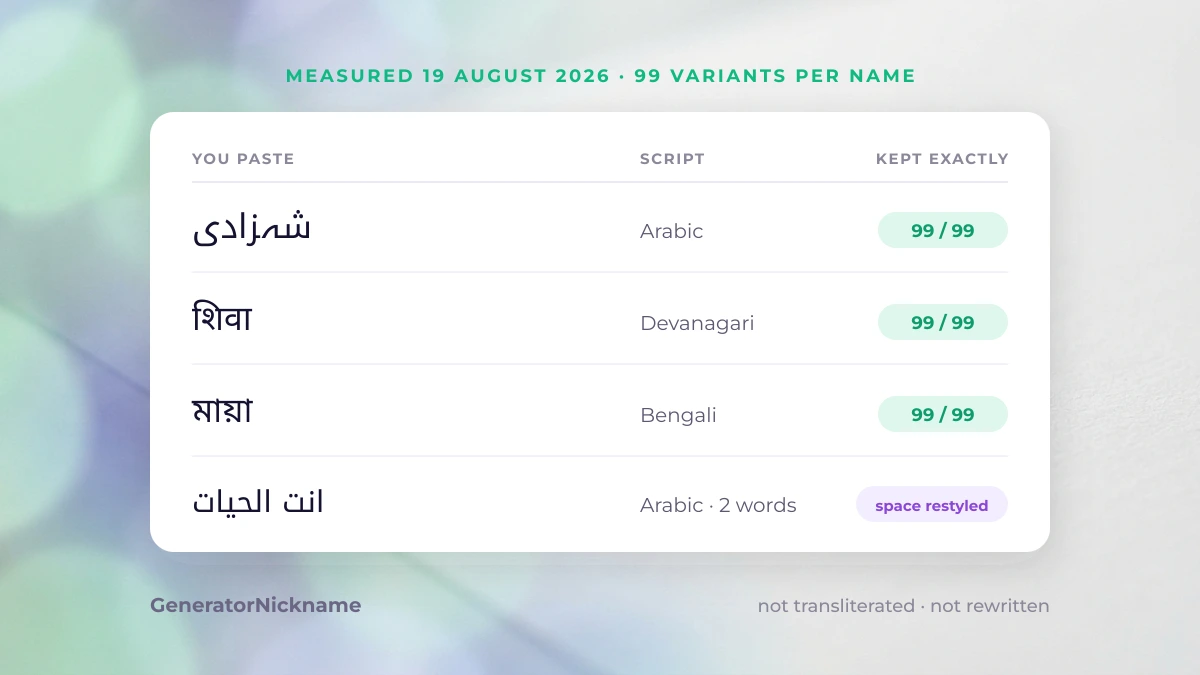
| You paste | Script | What came back |
|---|---|---|
| Sarah (English) | Latin | restyled into Unicode letter sets — the point of the tool |
| شہزادی (Urdu) | Arabic | 99 of 99 kept it exactly |
| انت الحیات (Arabic, two words) | Arabic | both words kept; the space becomes a decorative separator |
| शिवा (Hindi) | Devanagari | 99 of 99 kept it exactly |
| মায়া (Bangla) | Bengali | 99 of 99 kept it exactly |
The distinction matters more than it sounds. A generator that transliterates turns شہزادی into “shehzadi” and quietly hands you a different name. One that decorates keeps the word you actually own and puts the ornament around it, so the result still reads correctly to anyone who speaks the language. If your name mixes scripts — a Latin handle with an Arabic word in it, say — both halves survive the trip.
Two-word names are the one case worth knowing about: the generator treats the gap between words as a place to put a symbol, so انت الحیات comes back as انتღالحیات — both words intact, the space restyled. Right-to-left names otherwise behave as you would expect: frame characters sit on the visual outside, not jammed into the middle of a word.
Copy any result, or any decoration, in one tap
Every result and every decoration on this page copies with a single tap — no text selection, no long-press menu, no accidental half-word. Tap any tile below and the exact characters go to your clipboard, ready to paste into a profile, a bio or a game name field.
The set below is a curated pool of 122 decorations, grouped so you can find a mood rather than scroll a wall of symbols. They are building blocks: paste one before your name, one after, or use a frame that already has a gap in the middle.
Bows, lace & fairycore
Sparkles & stars
Hearts & love
Butterflies, sea & garden
Crowns & royal frames
Cute faces (kaomoji)
Gaming & badass
Dividers & underlines
If a tile looks like an empty box on this screen, that is your device missing one glyph, not a broken character — the same string usually renders correctly once pasted into Instagram, TikTok or WhatsApp. Copy it and look at it there before deciding.
Preview how it looks before you paste it
Read the result in the list before you commit it to a profile, because two things change between the preview and the live field: the character count, and the font your platform draws it with. The count is the one that breaks names, and you can check it here.
Platforms measure a name in characters, not in how wide it looks on screen. A frame is made of real characters, so it spends your budget:
| What you paste | Example | Code points | Cost vs plain name |
|---|---|---|---|
| Plain name | Sarah | 5 | — |
| Styled letters only | 𝓢𝓪𝓻𝓪𝓱 | 5 | +0 |
| Small caps | sᴀʀᴀʜ | 5 | +0 |
| Name in a light frame | ⋆˚✿ Sarah ✿˚⋆ | 13 | +8 |
| Name in a heavy frame | ꧁༒☬Sarah☬༒꧂ | 11 | +6 |
So a name that fits comfortably as styled letters can be rejected the moment you wrap it in a heavy frame. When a field refuses your name, drop the frame first and keep the styled letters — that is the edit that costs you the least.
The second difference is the typeface. These characters are drawn by whatever font the app uses, so the same string looks slightly different on an iPhone, on Android and in a desktop browser. That is normal and it is not something any generator can control.
Why some styles disappear when you save
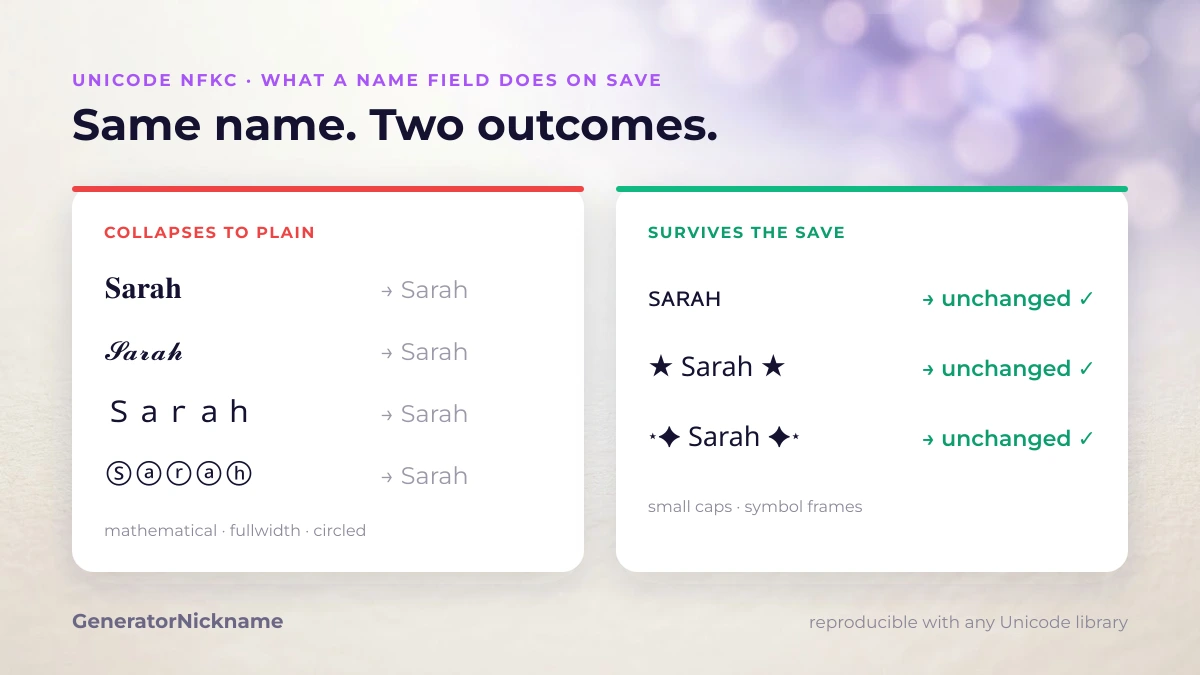
Some styled names revert to plain letters the instant you press save. That is Unicode normalisation, specifically NFKC: the platform rewrites “compatibility” characters back to their plain equivalents before storing your name. It is a deliberate rule, not a bug, and it hits some style classes while leaving others untouched.
NFKC is defined by the Unicode Consortium in UAX #15, Unicode Normalization Forms, so this behaviour is a published standard rather than a quirk of any one app. We ran the same name through NFKC in each style class, and the result is reproducible on any machine with a Unicode library:
| Style class | Example | After NFKC | Survives? |
|---|---|---|---|
| Mathematical bold | 𝐒𝐚𝐫𝐚𝐡 | Sarah | No — collapses |
| Mathematical script | 𝓢𝓪𝓻𝓪𝓱 | Sarah | No — collapses |
| Double-struck | 𝕊𝕒𝕣𝕒𝕙 | Sarah | No — collapses |
| Fullwidth | Sarah | Sarah | No — collapses |
| Circled | Ⓢⓐⓡⓐⓗ | Sarah | No — collapses |
| Superscript | ˢᵃʳᵃʰ | sarah | No — collapses |
| Small caps | sᴀʀᴀʜ | sᴀʀᴀʜ | Yes — kept |
| Frame + symbols | ꧁༒☬Sarah☬༒꧂ | ꧁༒☬Sarah☬༒꧂ | Yes — kept |
If you want the mechanics underneath this, we take a styled name apart character by character and show what each one officially is. The pattern is consistent: styles built from the Mathematical Alphanumeric Symbols block — bold, script, double-struck — plus fullwidth, circled and superscript letters all carry a compatibility mapping back to ASCII, so a normalising field erases them. Small caps and decorative frames have no such mapping, so they survive.
This is the single most useful thing to know before you pick a style. If a platform has stripped your name once, it will strip it every time, and choosing a surviving class is the only fix. It is also why the same string can work in a display name but not in a username: username fields tend to normalise and restrict, display-name fields usually do not. On Instagram, for example, the display name is the field that accepts styling, and the @handle is not.
Frequently asked questions
Are these fonts I have to install?
No. Nothing here is a font file and there is nothing to download. Every style is made of Unicode characters that already exist on your phone and computer, which is why a styled name travels inside a normal text field. A real font changes how text is drawn; these characters are different characters that happen to look like styled letters.
Which platforms strip the styling?
Any field that applies Unicode NFKC normalisation before saving. In practice that hits mathematical, fullwidth, circled and superscript letters, which fall back to plain ASCII. Small caps and decorative frames are ordinary characters rather than compatibility variants, so they are the safest choice when a field is strict.
How many characters does a name field allow?
It depends on the platform, and the limit is counted in characters, not in how wide the name looks. TikTok, for example, allows 2–24 characters in a username and accepts only letters, numbers, underscores and full stops there. A heavy frame can more than double your count: Sarah is 5 characters, but the same name inside a full frame is 11. If a field rejects your name, remove the frame first and keep the styled letters. We only quote limits we have confirmed, so treat any number you read elsewhere as worth re-checking against the app itself.
Does it work with Urdu, Arabic, Hindi and Bangla names?
Yes, and your characters come back exactly as you typed them. The generator decorates around the string instead of transliterating it, so an Urdu or Bangla name is never rewritten into Latin letters. The test table near the top of this page shows the measured result for five scripts.
How to read these numbers
The numbers above are character counts and code points that anyone can reproduce. The normalisation table is plain Unicode behaviour you can reproduce, and the script table is this generator’s own output. Our editorial policy explains how we check and date this kind of claim, and who runs GeneratorNickname covers the team behind it. Found something that no longer matches what your platform does? Tell us and we will review the page and update the date.
Built on your word
Type anything and every result is styled from it on the spot — never picked off a stored list.
One tap to copy
Tap any nickname to copy it, then paste it straight into your profile or lobby.
Dozens of styles
Small caps, bold, cursive, spaced and symbol pairs — switch between them in one click.
Shareable results
Every set of results has its own link, so you can send a name to a friend exactly as you saw it.
Use Your Nickname Anywhere, Anytime
Perfect for games, social media, usernames, clan names, and more!
- Games (PUBG, Free Fire, COD...)
- Social Media (Instagram, TikTok, Twitter...)
- Chat Apps (Discord, WhatsApp, Telegram...)
- Forums and communities